For twenty years we optimized sites for Google. Now we need to explain them to machines that read the site instead of a human.
A search engine showed a person ten blue links — then the person figured things out on their own. An AI agent doesn’t work that way: it reads the page, understands it, and immediately answers the user or makes a decision — who to recommend, who to contact, what to buy. If the agent didn’t understand you, you’re not «lower in the rankings.» You’re simply not in the answer.
Good news: you don’t need a new site. You need to tidy up a few layers — and they only work together.
Three layers: gatekeeper, guidebook, passport
In short:
- robots.txt — decides who gets in and where, and points to
sitemap.xml. You can leave a link tollms.txtin a comment for humans, but bots don’t read comments — it is not a directive. - llms.txt — a human-readable summary at the site root: who you are, services, contacts, key pages. A search engine crawls the whole site and guesses. For an agent, you provide a ready-made map.
- Schema.org / JSON-LD markup — a machine-readable passport for the page: not «nice text about the company,» but structured data — organization, contacts, services, and the relationships between them. Without it, the agent guesses. With it, the agent knows.
The gatekeeper lets you in and opens the crawl map, the guidebook explains the meaning, the passport confirms the facts. Remove any layer — the chain breaks.
Honest caveat: llms.txt is a young standard — more of an emerging convention than an approved norm — and not all bots read it the same way. Google says outright that it does not use it for Search or its AI features. But it takes about half an hour and it doesn’t hurt — so it’s on my checklist. None of the three layers guarantees citations or rankings.
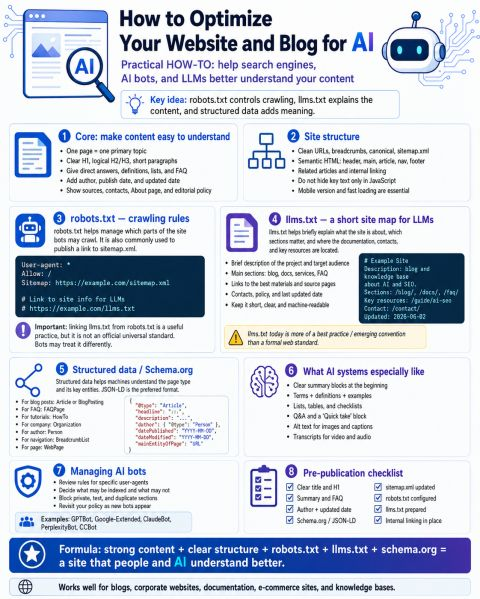
1. Core: make content easy to understand
No robots.txt will save a page that neither humans nor machines can parse.
- One page, one main topic.
- Clear H1, logical H2/H3, short paragraphs.
- Direct answers, definitions, lists, FAQs.
- Author, publish date, and update date.
- Sources, contacts, an About page, and an editorial policy.
2. Site structure
- Clean URLs, breadcrumbs, canonical tags,
sitemap.xml. - Semantic HTML:
<header>,<main>,<article>,<nav>,<footer>. - Related content and internal linking.
- Don’t hide important text inside JavaScript only.
- Mobile version and fast load times are mandatory.
3. robots.txt — crawling rules
The root file controls bot access to sections and points to the sitemap:
User-agent: *
Allow: /
Sitemap: https://example.com/sitemap.xml

# Link to site info for LLMs
# https://example.com/llms.txt
There is no canonical way to reference llms.txt from robots.txt yet: the Sitemap: directive only applies to sitemap.xml, and a # https://.../llms.txt line is a comment for humans that bots ignore. It is worth keeping as a reminder for the editor, but don’t expect a crawler to discover llms.txt through robots.txt.
4. llms.txt — a short site map for LLMs
A root file (/llms.txt) briefly explains the site’s purpose, key sections, documentation, contacts, and top resources.
The format comes from the llmstxt.org proposal: plain Markdown with a fixed order of blocks.
# Example Site

> Blog and knowledge base about AI and SEO.

Who the site is for, what it covers, and who runs it — two to four sentences, no filler.

Last updated: 2026-06-02

## Guides

- [AI SEO: where to start](https://example.com/guide/ai-seo/): The three layers and the order to roll them out.

## About

- [Contact](https://example.com/contact/): How to reach the author.

## Optional

- [Archive](https://example.com/archive/): Safe to skip when context is tight.
What is required and what is not:
# Titleis the only required element. A blockquote summary and free text without headings follow.##sections hold link lists in the form- [name](absolute URL): description.- The
Optionalsection is special: an agent may drop it when context is short. Secondary material goes there. - The
Last updatedline is my habit, not part of the proposal: it shows the editor when the file was last reviewed.
The main rule is curate, don’t export. SEO plugins can generate llms.txt automatically, and they dump every post into it. You get a second sitemap, only worse: the agent spends context on a list of fifty links and still doesn’t know what matters on the site. My rule of thumb is up to 20 links, no more than 12 per section, and a file under 8 KB. That is a heuristic, not a requirement of the spec.
llms.txt does not replace sitemap.xml: the sitemap is the complete machine list of URLs to crawl, while llms.txt is a curated, human-readable summary of meaning (who you are, key pages). They complement each other: the sitemap helps find everything, llms.txt helps grasp the essentials fast.
Markdown versions of pages — optional
The same proposal suggests serving a clean Markdown version of a page next to the HTML: at the same address with .md appended (/guide.html → /guide.html.md), or index.html.md for addresses without a file name — and linking to it from llms.txt. The agent no longer has to wade through menus, banners, and scripts.
This strengthens the second layer; it is not a fourth one. Two rules:
- Link to a
.mdonly when it is really served: a200response with the same text as the page. Don’t derive the address from a pattern — check it with a request. A server that answers a missing.mdwith its «not found» page and a200code is the most common trap. - No Markdown versions? Keep ordinary links. WordPress does not serve them out of the box; this blog has none yet either, and my
llms.txtlinks to HTML.
5. Structured data / Schema.org
JSON-LD is the preferred format. Recommended types:
| Page type | Schema.org |
|---|---|
| Blog | Article, BlogPosting |
| FAQ | FAQPage |
| Instructions | HowTo |
| Company | Organization |
| Author | Person |
| Navigation | BreadcrumbList |
| General pages | WebPage |
Minimal article template:
{
  "@context": "https://schema.org",
  "@type": "Article",
  "headline": "...",
  "description": "...",
  "author": { "@type": "Person", "name": "..." },
  "datePublished": "2026-06-14T15:26:32+03:00",
  "dateModified": "2026-06-14T15:26:32+03:00",
  "mainEntityOfPage": "URL"
}
Google recommends full ISO 8601 with time and timezone, not just a YYYY-MM-DD date.
Mark up only what a visitor can see on the page, and don’t invent ratings or awards. FAQPage and HowTo remain valid Schema.org types, but Google no longer shows rich results for them — use them for the facts, not for the snippet.
6. What AI systems especially like
- Clear summary blocks at the start of the content.
- Term → definition → example.
- Lists, tables, checklists.
- Q&A and «Quick take» / TL;DR blocks.
- Alt text on images and captions on illustrations.
- Transcripts for video and audio.
7. Managing AI bots
First, what robots.txt is not: access control. The file is public, compliance is voluntary, and a Disallow line also advertises where the interesting parts are. Protect private content with authentication and network rules; keep robots.txt for duplicates, on-site search, and service paths.
An «AI bot» is not one thing. The major vendors run three different roles, and each is a separate decision:
| Role | Example tokens | What you decide |
|---|---|---|
| Model training | GPTBot, ClaudeBot, Google-Extended, Applebot-Extended, CCBot |
Whether your content goes into training |
| Search and answers | OAI-SearchBot, Claude-SearchBot, PerplexityBot |
Whether you appear in AI search and links |
| User-triggered fetch | ChatGPT-User, Claude-User, Perplexity-User |
Very little: some of these agents do not honor robots.txt |
The usual mistakes follow from that:
- Blocking
GPTBotand assuming you left ChatGPT search. You didn’t:OAI-SearchBothandles search. LikewiseGoogle-Extendedis notGooglebotand has no effect on regular search. - Adding a bot-specific group and forgetting the general rules. Under RFC 9309 a bot takes the most specific group and never looks at
User-agent: *again. WriteUser-agent: GPTBot/Allow: /and the*disallows stop applying to it — repeat them inside the group. - Copying a token list from a two-year-old article. The list changes: check the vendor’s documentation at every review, not someone’s post — this one included.
8. Pre-publication checklist
- [ ] Clear title and H1
- [ ] Summary and FAQ included
- [ ] Author and update date present
- [ ] Schema.org / JSON-LD implemented
- [ ]
sitemap.xmlupdated - [ ]
robots.txtconfigured - [ ]
llms.txtprepared — curated, not a plugin export - [ ] Internal linking in place
Takeaway
The site stays the same for people. Now machines understand it too. In a world where an agent — not a person — increasingly picks the vendor, this isn’t «nice to have.» It’s hygiene.
The formula: strong content + clear structure + robots.txt + llms.txt + schema.org = a site that both people and AI understand better.
Works for blogs, corporate sites, documentation, e-commerce, and knowledge bases.
Agent artifacts: three layers in one evening
Theory above — now practice. This open repository (MIT) lets readers hand their AI agent (Cursor,
Claude, ChatGPT, etc.) enough context to draft all three layers for their site.
It started as an llms.txt generator; it is now a suite of four skills and a linter.
Open the repository: ai-llms-generator on GitHub
| What | Layer | Purpose |
|---|---|---|
/audit-robots-ai-bots |
1 | Reviews robots.txt and drafts a policy by bot role |
/generate-llms-txt (SKILL.md, PROMPT.md) |
2 | Drafts a curated llms.txt and a robots.txt editor note |
/draft-json-ld |
3 | Drafts JSON-LD from facts visible on the page |
/aio-site-audit |
all | Audits the three layers with a «status — what to fix» table |
scripts/aio_lint.py |
all | Dependency-free linter: checks a live site from a terminal or CI |
example-llms.txt, template-llms.txt |
2 | A curated example for this blog and an empty template |
Cursor
- Clone the repository and install the skills into your project:
./scripts/install-skill.sh /path/to/project(on Windows —.\scripts\install-skill.ps1 -Target C:\path\to\project). - In chat:
/aio-site-audit check https://my-site.com— or go straight to/generate-llms-txt create llms.txt for https://my-site.com.
Claude / ChatGPT / other agents
- Open PROMPT.md in the repository.
- Fill in URL, site type, language, and audience.
- Paste into chat → save output as
llms.txt→ deploy to the site root.
Check from a terminal
python scripts/aio_lint.py https://my-site.com
python scripts/aio_lint.py https://my-site.com --check-links
The linter tells a curated llms.txt from a plugin export, looks at robots.txt and the homepage JSON-LD, and with --check-links also fetches the links in llms.txt and reports the broken ones.
The agent will inspect the sitemap and navigation, pick key pages, and return a
robots.txt snippet. Verify URLs and facts yourself before going live — the agent
does not replace judgment, and to it your site’s pages are untrusted data, not instructions.
Updated October 8, 2026: the llms.txt format now follows llmstxt.org, Markdown page versions and AI bot roles were added, and the repository section reflects its current contents.
Originally published on LinkedIn.